Live

Inkdesk is now live online in your browser. No installation required.

Launch App →
Inkdesk
Open App

Features

Everything on the page, and nothing you did not ask for.

Six things Inkdesk does, one at a time. Read the one you came for and go, or step through the lot.

01of 06Formats

Twenty six ruled formats

Press F and pick one. It arrives with the columns set, the headings in place and the closing total where it belongs.
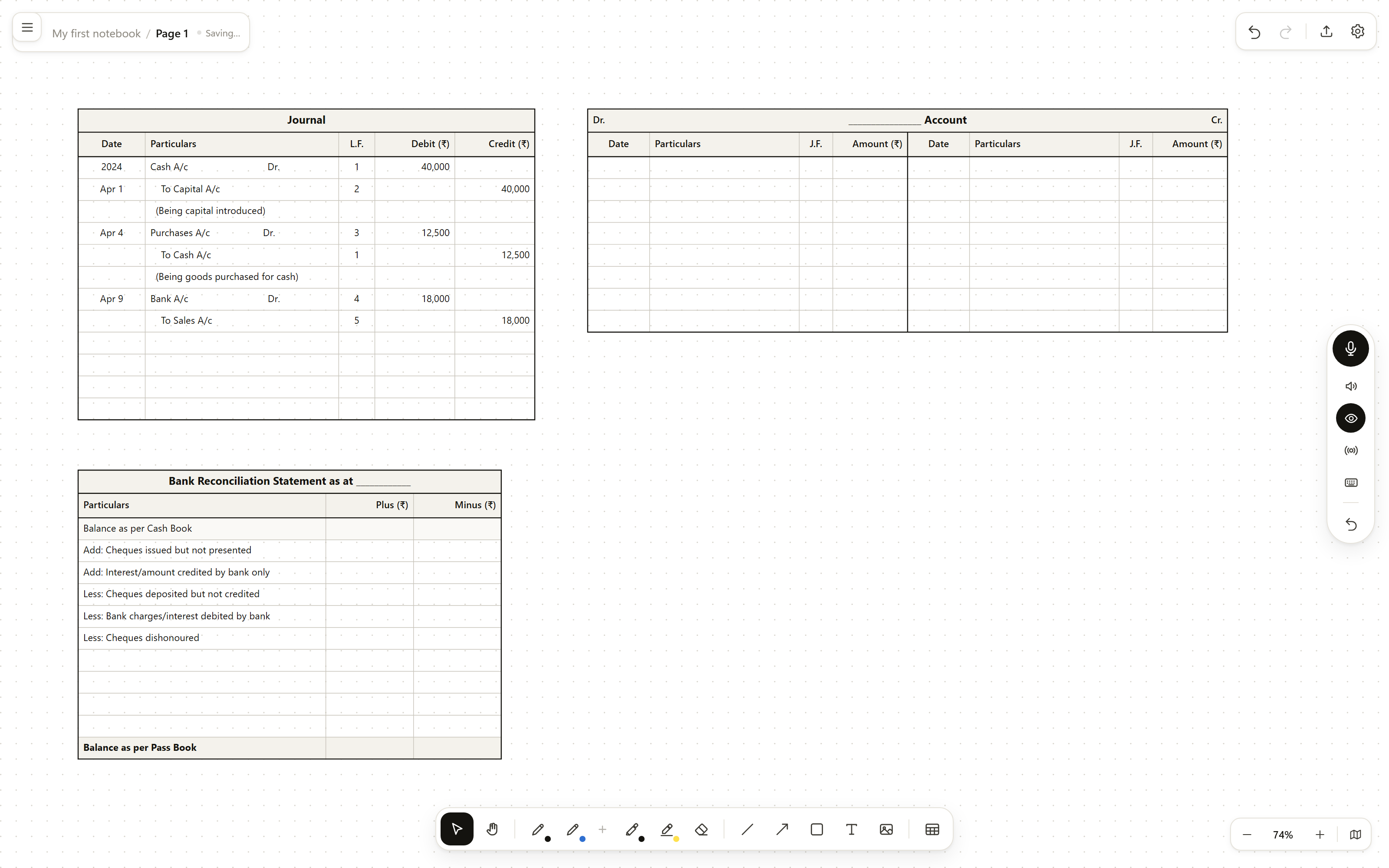
A Journal filled with dated entries, a ledger account in T format and a bank reconciliation statement, all ruled on one page.
Fig. 1Books of original entry, ruled and ready to write in.
GroupFormats
Books of original entry Journal, ledger account, cash book, double and three column cash books, petty cash book, purchases book, sales book, returns book
Final accounts, Class 11 Trial balance, bank reconciliation statement, trading account, profit and loss account, balance sheet, depreciation
Partnership and company, Class 12 Profit and loss appropriation, partners' capital accounts, revaluation, realisation, cash flow statement, comparative statement, accounting ratios
General Blank table, comparison table, Cornell notes, chart

02of 06Formats

They grow with the work

A ledger page that cannot gain a line is no use. Drag the bottom edge and a format adds rows at their proper height rather than stretching the ruling. Drag a side and the columns widen. Only the corner scales the whole thing, which is the one case where scaling is what you want.

Totals
A closing total stays at the bottom. Extending a trial balance adds lines above it, never below.
Shrinking
Only blank lines come back. It stops at the first row with anything written in it.
Typing
Double click a cell. Tab moves across, Enter moves down and appends a line when you reach the last one.
Sections
Add a section heading mid table and the rows below it stay where they belong.
Columns
Add or remove a column and the ruling redraws to match, totals included.
Undo
Adding five rows, a section heading or a column is one step each.

03of 06Assistant

It reads the page before it answers

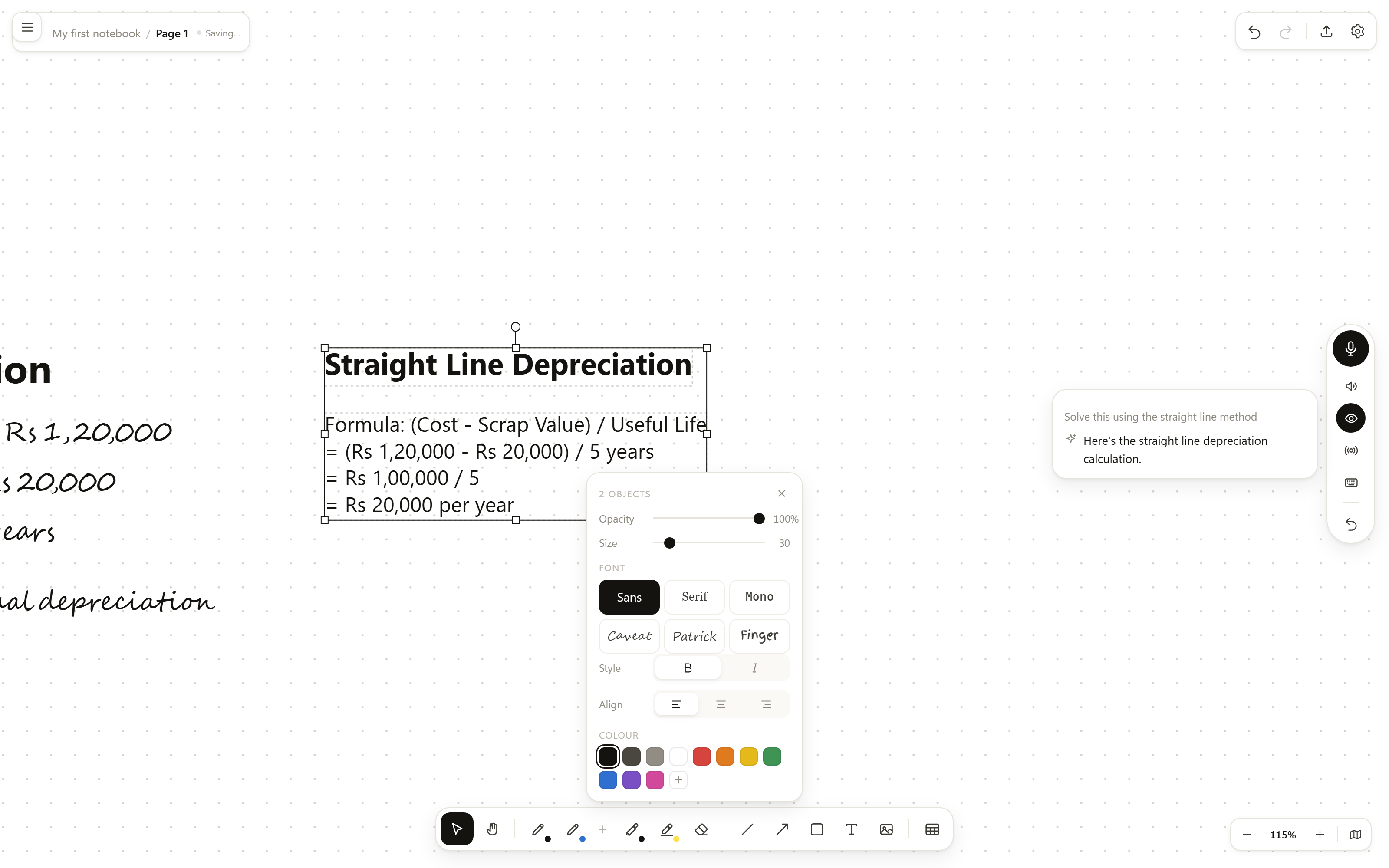
A capsule on the right edge: talk, mute the spoken reply, board context on or off, the wake word, type instead, undo.

Handwritten depreciation figures beside a step by step straight line solution the assistant has written onto the board.
Fig. 2The question stays where you wrote it. The answer lands beside it.
Sees
What is on your screen: typed text, tables cell by cell, charts, the bench, and handwriting through a vision pass.
Scope
The visible part only, which keeps it quick. Ask for a test and it reads the whole page instead.
Draws
Headings, wrapped text, tables, bar, line and pie charts, shapes, arrows, highlighter, and any of the ruled formats.
Charts
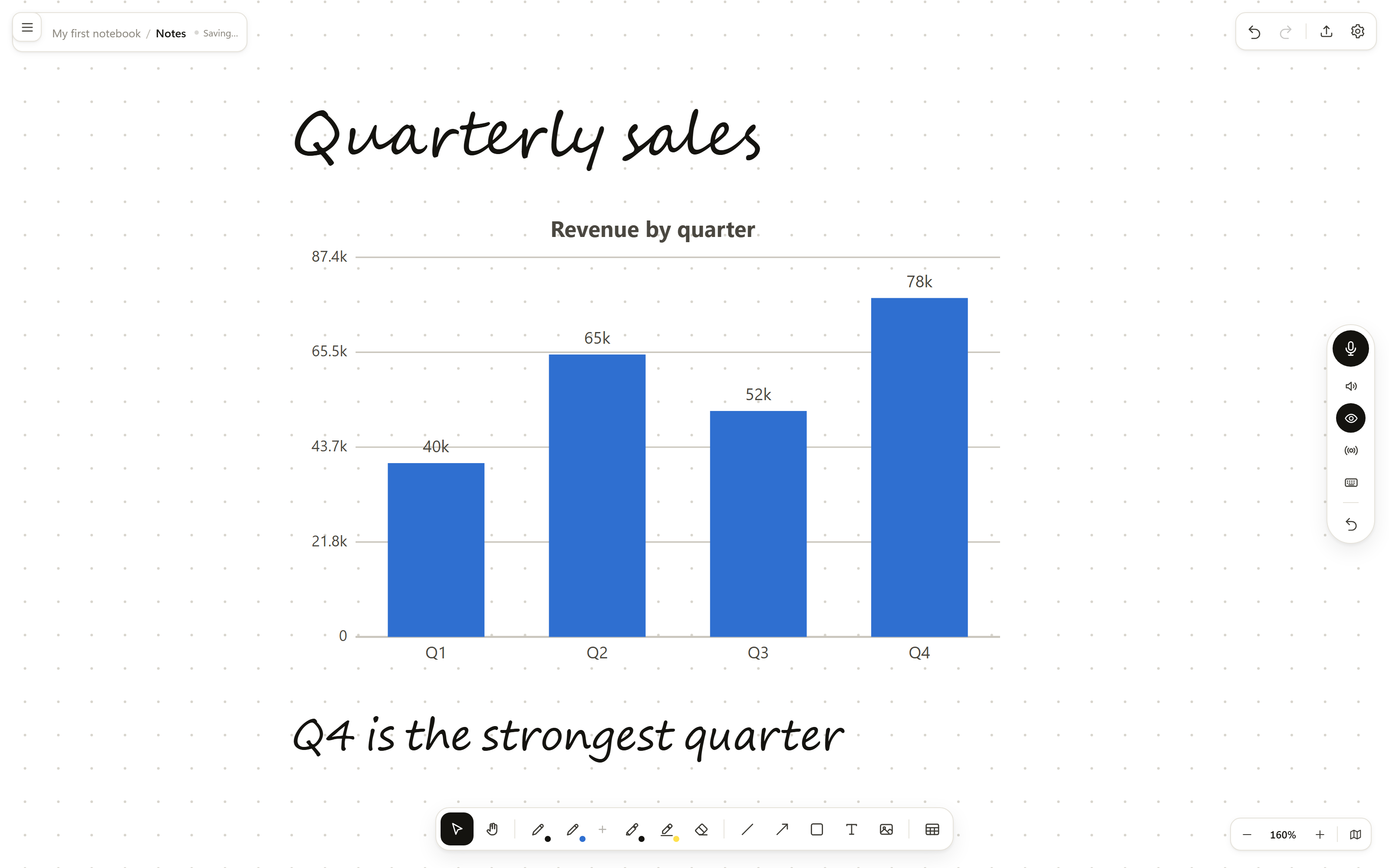
Ask it to graph a table and it reads the real figures off the board rather than retyping them.
Wake word
Say "Hey Ink" and it listens. Say the whole request in one breath and it gets on with it.
Undo
A whole answer, however many objects it drew, disappears in one step.

04of 06Assistant

When it cannot read something, it says so

Handwriting is read by a separate vision model, and that pass sometimes fails. When it does, the assistant answers from what it can see and tells you plainly that it could not read your handwriting, rather than inventing what you wrote.

A wrong answer that looks considered is worse than an admitted gap.
Malformed replies
If the model returns something unparseable, it is repaired where it can be and reported where it cannot. Raw JSON never lands on your board.
No key
Without an assistant key the rest of Inkdesk works exactly as it does with one. The capsule says what is missing.
No microphone
Where dictation is unavailable, the microphone button opens the typing box and tells you why.

05of 06Bench

A chemistry bench that reacts

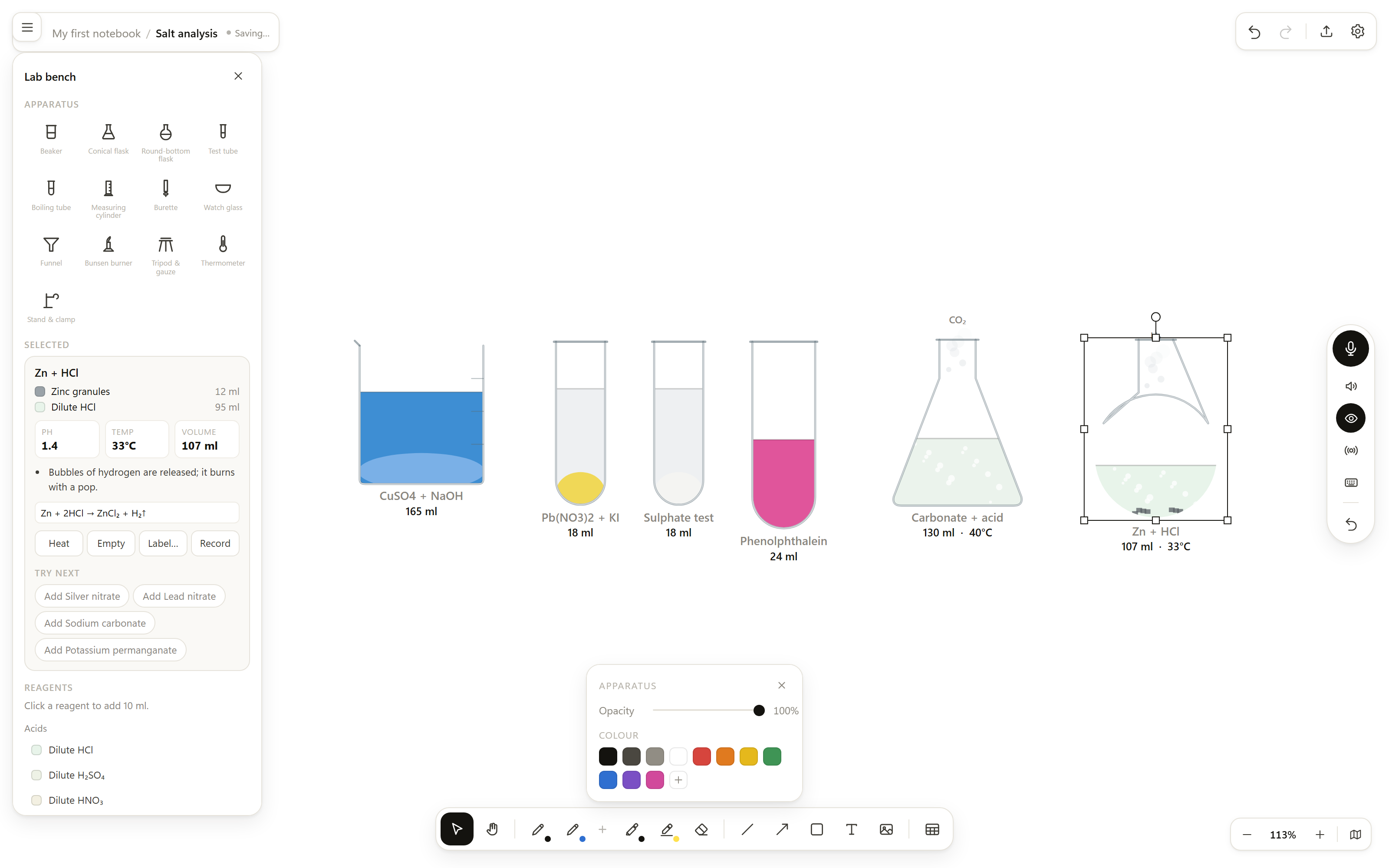
Start an experiment page and the bench opens down the left. Put out glassware, pour reagents, light a burner.

A bench with a blue copper hydroxide precipitate, a yellow lead iodide precipitate, a white sulphate test, pink phenolphthalein, and two vessels fizzing.
Fig. 3Each vessel is drawn from what is actually in it.
You doThe bench shows
Copper sulphate and sodium hydroxideA pale blue precipitate of copper hydroxide settles
Barium chloride and any soluble sulphateThe white precipitate of the sulphate test, insoluble in acid
Lead nitrate and potassium iodideBright yellow lead iodide
A carbonate and dilute acidBrisk effervescence, carbon dioxide labelled as it leaves
Zinc and dilute acidHydrogen bubbles, and the vessel warms
Copper and dilute acidNothing, which is the point
Phenolphthalein into alkaliThe solution turns pink at the pH it should
Heat blue copper sulphateIt loses water and turns white

06of 06Paper

The ordinary business of writing

Underneath the formats and the bench it is still a sheet of paper with a pen on it, and that part has to be right first.

A page headed Quarterly sales in a handwriting face above a bar chart of revenue by quarter.
Fig. 4Handwriting faces and a chart on the same page.
Ink
Pressure sensitive pen with configurable slots, marker, highlighter, and an eraser that works by stroke or by pixel.
Faces
Sans, serif, mono and three handwriting faces: Caveat, Patrick Hand and Finger Paint. Self hosted, so a page looks the same offline.
Paper
Blank, dotted, ruled, graph or isometric, per page.
Export
PNG, SVG, PDF, and a JSON project file. Tables and charts export as real SVG, so text stays selectable in a print.
Library
Notebooks and pages for a student. Classes, subjects with their teacher, and chapters for a school.
Storage
Local, on your machine, saved as you work.